.webp)
.webp)
.webp)
.webp)

Download SocksDroid APK – Proxy-based VPN, Socks5, Android, Free, Secure, Latest Version
Overview
SocksDroid is a free, open-source proxy-based VPN client designed for Android devices. Developed by Boundary Effect, the application leverages Android’s built-in VPN framework to provide users with a customizable way to route internet traffic through their own Socks5 servers. Unlike traditional VPN services that operate on proprietary infrastructure, SocksDroid does not host its own servers. Instead, it functions as a client that connects to user-defined Socks5 endpoints, offering advanced control over network configurations.
The software is tailored for users who require granular control over their internet traffic, such as developers, network administrators, or privacy-conscious individuals managing their own proxy infrastructure. It enables secure browsing, bypasses geo-restrictions, and enhances data protection when using public Wi-Fi networks. Real-world use cases include configuring proxy settings for specific applications, routing traffic through remote servers for anonymity, or integrating with third-party proxy services for enhanced performance.
The developer did not provide additional details about the company or its background beyond the name. The app is available exclusively for Android and is distributed as a free APK, with no in-app purchases or advertisements. It is not intended for casual users due to its technical complexity and reliance on external server access.
Key Features & Capabilities
- Custom Socks5 Server Integration – Users can manually input their preferred Socks5 server details, including IP address and port, to route all or selected traffic through a remote endpoint.
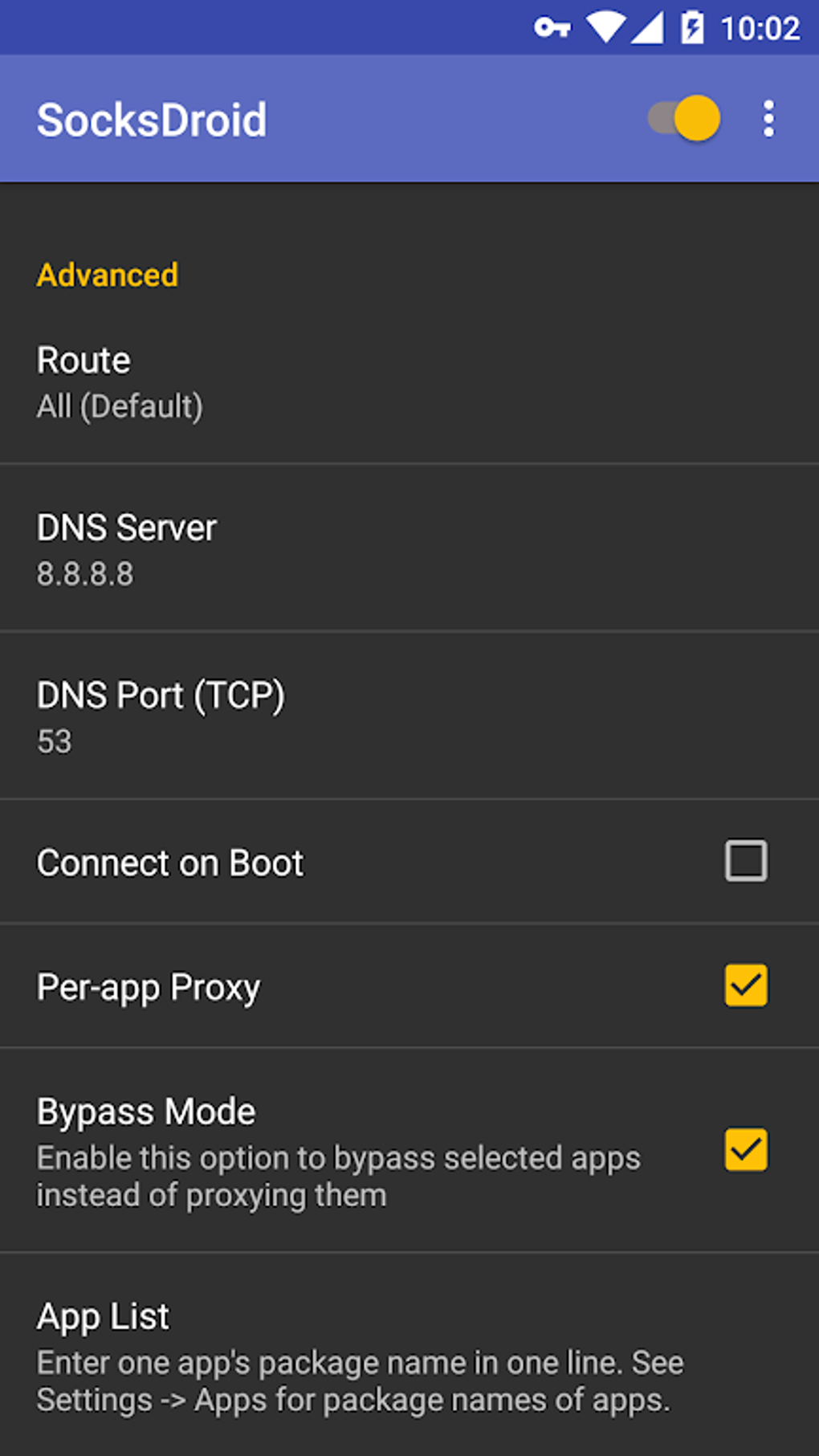
- Per-App Proxy Settings – Allows selective routing of network traffic from specific applications, enabling fine-grained control over which apps use the proxy.
- Username and Password Authentication – Supports secure login credentials for Socks5 servers, ensuring only authorized users can establish connections.
- UDP Forwarding Support – Enables faster data exchange with remote servers, particularly beneficial for real-time applications like gaming or VoIP.
- IPv6 Forwarding Option – Available for networks that support IPv6, potentially improving connection speed and compatibility.
- DNS Configuration – Users can define custom DNS servers to enhance privacy or bypass DNS-based filtering.
- Open-Source Code – The application’s source code is publicly available, promoting transparency and security audits.
These features make SocksDroid ideal for advanced users managing their own proxy infrastructure. For example, a developer might use it to route only their IDE’s traffic through a secure server, while leaving other apps on the default network. Similarly, a user in a restricted region could leverage a trusted Socks5 server to access blocked content. The flexibility of configuration supports a wide range of technical workflows, though it demands familiarity with networking concepts.
User Interface, Workflow & Performance
The user interface of SocksDroid is functional and minimalistic, prioritizing configuration options over visual polish. Navigation is straightforward, with settings organized into logical sections such as server configuration, authentication, and advanced options. The workflow begins with defining a server profile, followed by enabling the proxy and selecting apps for per-app routing.
Performance is dependent on the quality and location of the user-defined Socks5 server. The developer did not specify resource usage details, so general observations are based on typical behavior of proxy clients. In most cases, such applications consume minimal CPU and RAM when idle, with usage scaling according to active data transfer. Stability is expected to be consistent, as the app relies on Android’s native VPN system, which is well-integrated and maintained by the platform.
However, users without prior experience may face a steep learning curve due to the technical nature of the settings. Misconfiguration could lead to connectivity issues or unintended traffic exposure. The app does not include built-in diagnostics or troubleshooting tools, so users must rely on external knowledge to resolve problems.
Compatibility & System Requirements
SocksDroid is designed for Android operating systems. The developer did not specify exact system requirements, including minimum Android version or hardware specifications. Installation size is not publicly disclosed, but given its lightweight nature as a proxy client, it is expected to occupy a small amount of storage space.
Compatibility information is limited to Android devices. The app is distributed as an APK file, meaning it is not available through the Google Play Store. Users must manually install the file, which may require enabling “Unknown Sources” in device settings. The developer did not provide details on support for tablet devices or other form factors.
Pros and Cons
Pros
- Free and open-source with no ads or in-app purchases
- Full control over proxy server selection and configuration
- Supports advanced features like per-app routing and UDP forwarding
- Uses Android’s built-in VPN framework for stable integration
- Enhanced privacy through user-defined servers and authentication
- Lightweight and efficient when idle
Cons
- Requires access to a personal or third-party Socks5 server
- Not suitable for beginners due to technical complexity
- No built-in server discovery or connection management tools
- Limited documentation or user support resources
- APK-only distribution may raise security concerns for cautious users
FAQ Section
Is SocksDroid available on Google Play?
SocksDroid is distributed as an APK file and is not available through the Google Play Store. Users must manually install the application.
Does SocksDroid provide its own servers?
No. SocksDroid does not operate its own servers. It functions as a client that connects to user-defined Socks5 servers.
Is SocksDroid secure?
The app itself is secure due to its open-source nature and reliance on Android’s native VPN system. However, security depends on the reliability and configuration of the user’s chosen Socks5 server.
Can I use SocksDroid offline?
Yes, the app can be installed and configured offline. However, it requires an active connection to a Socks5 server to function.
What type of license does SocksDroid use?
SocksDroid is free to use and distributed under an open-source license, allowing users to view, modify, and redistribute the code.
Final Thoughts + CTA
SocksDroid stands out as a powerful, flexible tool for advanced Android users seeking full control over their network traffic. While it lacks the plug-and-play simplicity of traditional VPN apps, its ability to integrate with custom Socks5 servers makes it a valuable asset for those with specific privacy, performance, or access needs. Its open-source model enhances trust, and the absence of ads or in-app purchases ensures a clean user experience.
However, it is not recommended for casual users or those unfamiliar with proxy configurations. The learning curve is significant, and success depends on having access to a reliable Socks5 server. For the right audience—tech-savvy individuals, developers, and privacy advocates—SocksDroid delivers unmatched customization and control.
Download SocksDroid APK now to take full command of your Android network connections.





.png)

